The Loyola Lean Launchpad class (LLP) uses a software package called Glidr to track our innovation and commercialization progress. the platform is used to:
- Record assumptions and create experiments to test those assumptions
- Record evidence of validation by logging interviews or recording results from other types of tests
- To track the iterative process of developing a validated business model
Instructors mentors and coaches can also use GLIDR to provide real time feedback to the team on interviews conducted and the business model being developed. This system replaces Launchpad Central (LPC) and is a more fully featured version of that system that was used heavily in the past.
Here are the 'official' on-boarding guides from GLIDR for both students (labeled 'collaborators or team members') and coaches/mentors (labeled 'observers'):
The basic structure of GLIDR uses a card structure (similar to Trello) to track 'assumptions' which are the building blocks of the business model canvas and 'evidence' which are the unit of validation. The log of an interview, for instance, would be considered a piece of 'evidence.' The card structure allows users to map relationships between different assumptions and pieces of evidence in a matrix or network rather than a linear relationship. For instance: one piece of 'evidence' can shed light on several assumptions and potentially in different ways.
The end goal here is to use the collection of 'evidence' to either validate or invalidate each assumption or individual hypothesis on the business model canvas.
For example: if one of the assumptions of my business model is that I am going to be a 'low cost provider,' this assumption would be stated as a component of my value proposition (and would show up as a hypothesis under that block of the canvas). I would then design an experiment, 'research plan' in GLIDR parlance, to validate or invalidate that assumption. Each part of the 'research plan,' would yield a piece of evidence that is linked to the assumption and interpreted as support for validation or invalidation (or a degree along that continuum). Pieces of the research plan for validating 'low cost provider' could include:
- Talking to potential manufacturing partners to gather data on production cost feasibility
- Interviewing competitors to determine if a low cost gap exists in the marketplace and to understand the other competing products that customers may be considering
- Talking to potential customers about their willingness to buy a low cost product, understanding what they consider low cost, and what features they consider less critical that could be eliminated to cut costs
- Creating a detailed parts list ordering and assembling a prototype to better understand labor allocation in assembly
Each of these pieces of evidence would either support (validate) or contradict (invalidate) the initial assumptions. Each 'unit of validation' may also explicitly (by design) or fortuitously support or contradict other assumptions that form part of the business model. This is what creates the matrix structure. It is also possible that older pieces of evidence that may have originally contradicted the hypothesis that they were initially designed to test, may support a new assumption or vice versa. GLIDR makes it easy to track and realize these insights over time.
The GLIDR interface is not incredibly intuitive on first glance. Here are couple of suggestions to help you get started quickly:
Team Members/Students
Here is the screen you should see when you login:
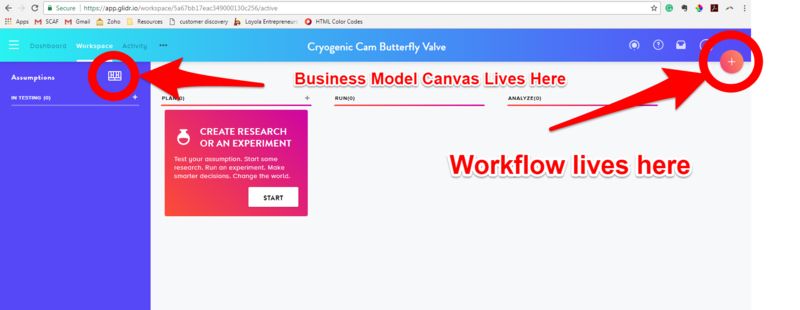
To Log an interview:
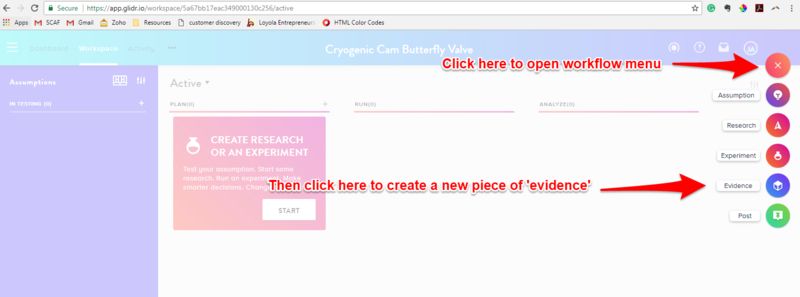
Then you will see this:
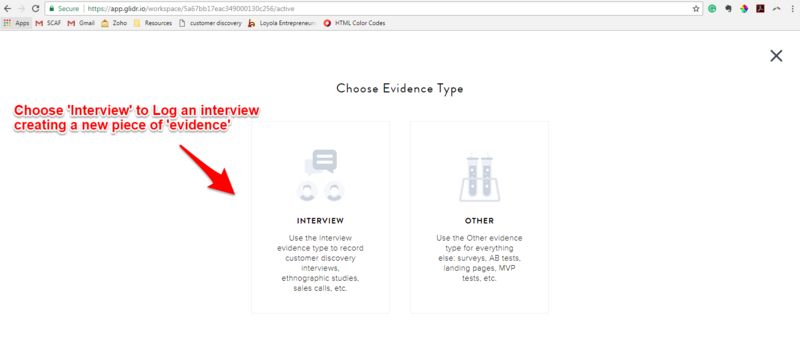
This opens the editing box for an 'evidence' card:
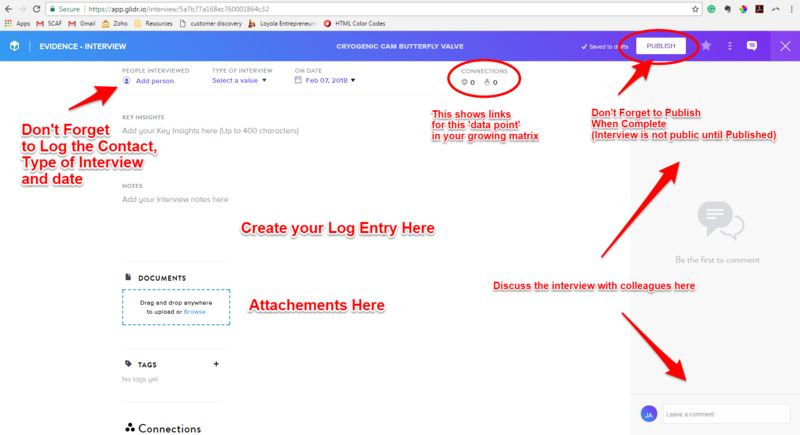
For guidelines on what makes a good interview log check out the How to Log an Interview Post on the Hub.
To flesh out your canvas/log your initial assumptions:
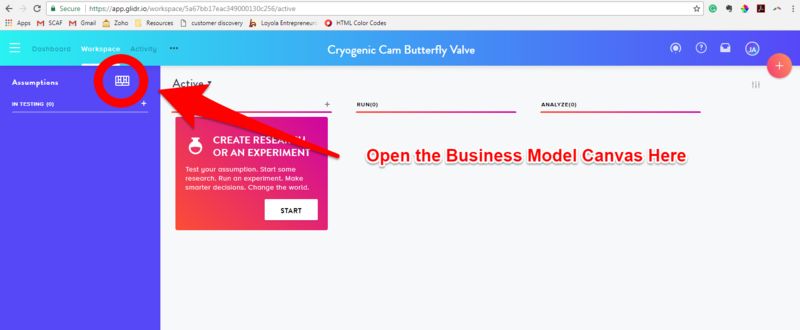
You will see your canvas take over the screen like this:
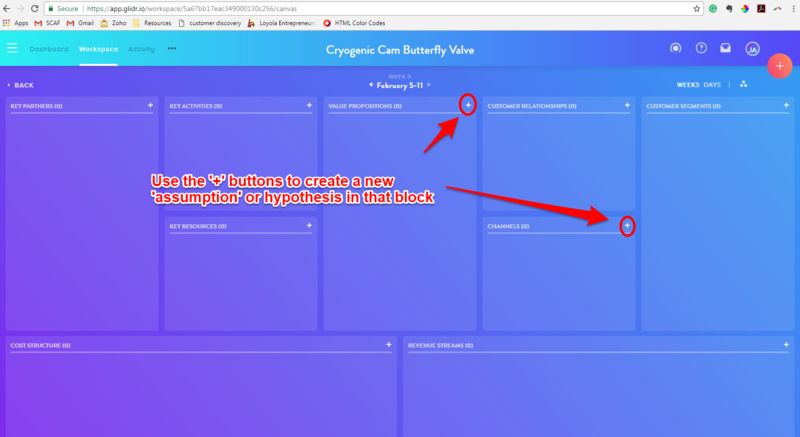
Like this:
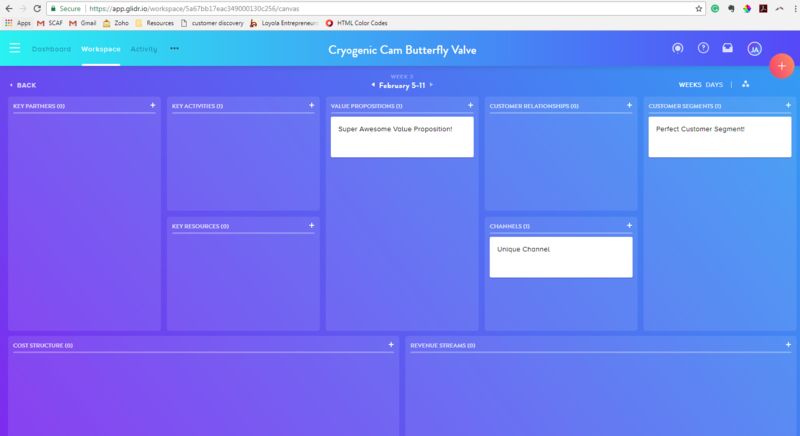
You can then double click on each card to open the card detail. You should use this to throughly explain you thinking behind this hypothesis.
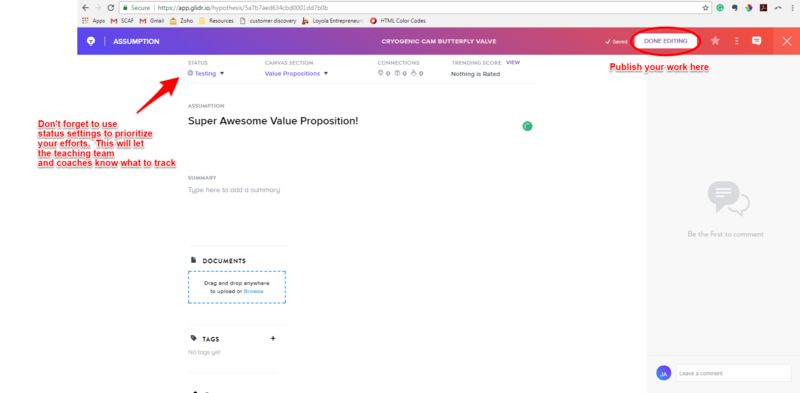
If you scroll down on this page (or an evidence detail page) you will see the part where you can link evidence and assumptions:
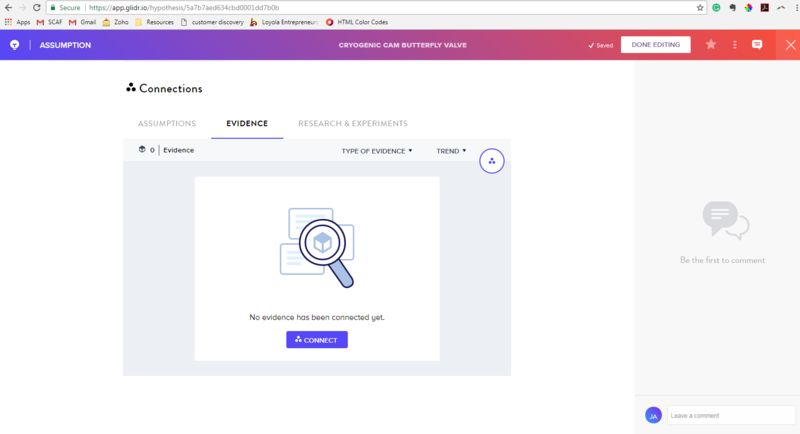
Once both the assumption and piece of evidence are in click 'connect' and follow the instructions from there.
Developing a Plan
There is also a research design section accessed from the work flow menu (big '+' on the right hand side of the screen) that allows you to organize and plan your testing in advance. This is very useful for logging the 'what we thought' at the beginning of a discovery or validation effort and making sure that we close the loop by tying our validation efforts back to making decisions about assumptions.
The research work flow looks like this:
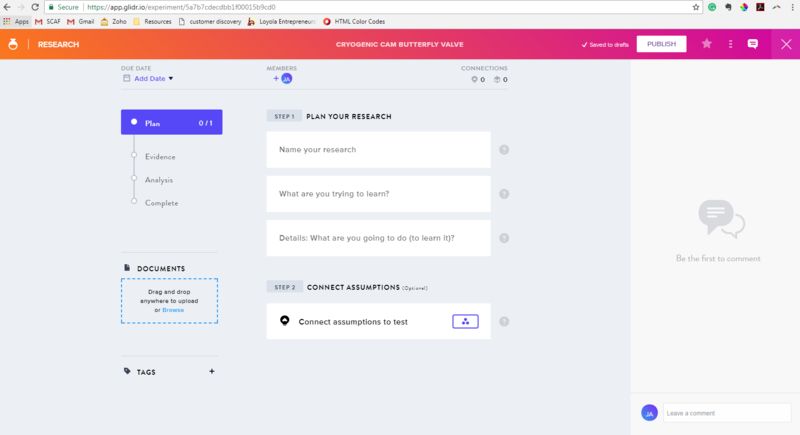
The system will track how quickly you and your team move through research cycles from open to close. This is a hallmark of a good innovation team.
Here is a useful post on experiment design: Crafting Effective Lean Start-up Experiments
GLIDR has a number of other features and menus that I am not going to cover here. Feel free to click around (everything can be deleted, although you may spam the entire team) or check out the bigger getting started guide. The dash boards and site organization will also start to make a lot more sense once you start to populate data. This is an experimentation platform don't be afraid to experiment.
One rule of the road: Unless something is a test or outright mistake, try to avoid 'deleting' business model hypothesis. Use validate or invalidate instead (hopefully with evidence based support). This will create a running log of lessons learned that is critical to the class and final deliverables.
Coaches and Mentors
Please scan through the student guide above to understand the basic functionality and menu structure.
Accessing the Business Model Canvas
Accessing the Interview Log
From the 'workspace' home screen, click 'activity' in the left hand navigation toolbar
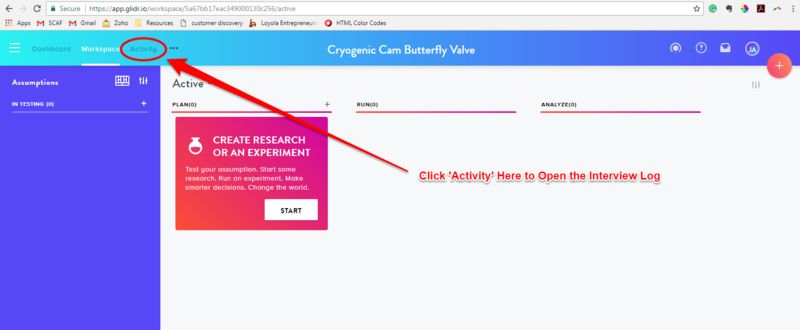
This opens the activity log:
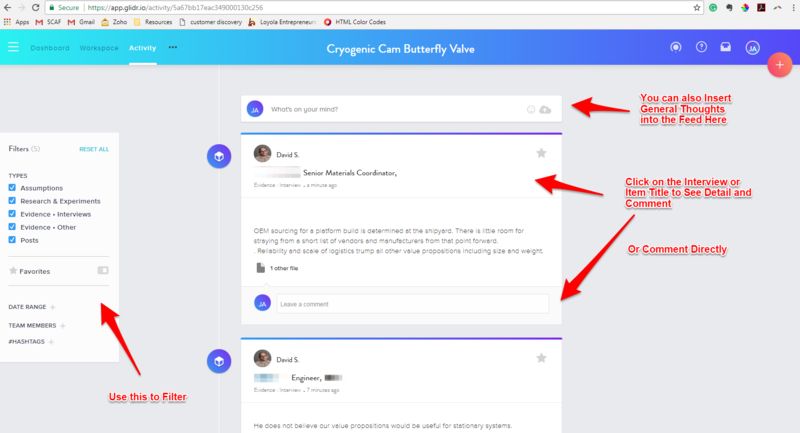
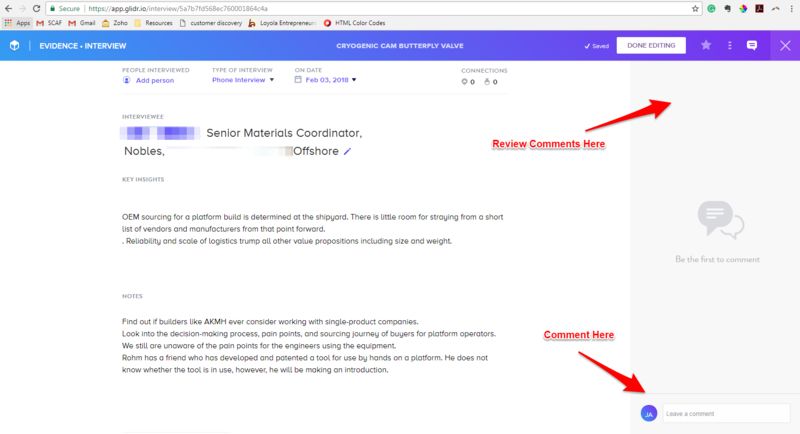
You can also use the side bar to comment on an evidence (interview) or assumption (Business model canvas element) detail page
Check out Glidr now: www.glidr.io or look for an invitation to sign up in your inbox.
Please email jjatkis@loyno.edu if you have additional questions or issues with GLIDR access.